search
Discover and install skills from GitHub repositories.
Quick Start
skillshare search vercel
This searches GitHub for repositories containing SKILL.md files that match your query.
How It Works
skillshare search <query>
        │
        ▼
GitHub Code Search API (filename:SKILL.md + query)
        │
        ▼
Fetch star counts for each repository
        │
        ▼
Sort by stars (most popular first)
        │
        ▼
Interactive selector → Install selected skill
Preview
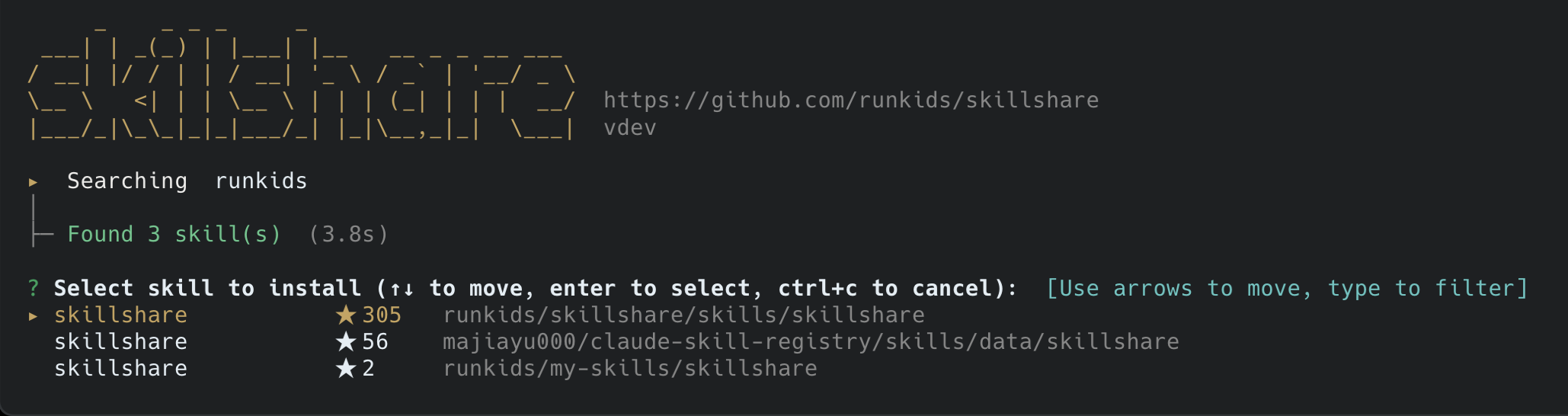
Controls:
↑↓— Navigate resultsEnter— Install selected skillCtrl+C— Cancel and exit- Type to filter results
After installing, you can search again or press Enter to quit.
Options
| Flag | Description |
|---|---|
--list, -l | List results only, no install prompt |
--json | Output as JSON (for scripting) |
--limit N, -n N | Maximum results (default: 20, max: 100) |
--help, -h | Show help |
Examples
Basic Search
skillshare search pdf           # Interactive search and install
skillshare search "code review" # Multi-word search
List Mode
skillshare search commit --list
Output:
  1.  fix                      facebook/react/.claude/skills/fix        ★ 242.7k
      Use when you have lint errors, formatting issues...
  2.  verify                   facebook/react/.claude/skills/verify     ★ 242.7k
      Use when you want to validate changes before committing...
  3.  commit-helper            cockroachdb/cockroach/.claude/skills/commit-helper ★ 31.8k
      Help create git commits and PRs with properly formatted messages...
JSON Output
skillshare search react --json --limit 5
[
  {
    "Name": "react-patterns",
    "Description": "React and Next.js performance optimization...",
    "Source": "facebook/react/.claude/skills/react-patterns",
    "Stars": 242700,
    "Owner": "facebook",
    "Repo": "react",
    "Path": ".claude/skills/react-patterns"
  }
]
Limit Results
skillshare search frontend -n 5 # Show only top 5 results
Authentication
GitHub Code Search API requires authentication. skillshare automatically detects your credentials:
-
GitHub CLI (recommended) — If you're logged in with
gh:gh auth login -
Environment variable — Set
GITHUB_TOKENorGH_TOKEN:export GITHUB_TOKEN=ghp_your_token_here
Creating a Token
If you don't use gh CLI:
- Go to GitHub Settings → Tokens
- Generate new token (classic)
- No scopes needed for public repos
- Set the token:
export GITHUB_TOKEN=ghp_your_token_here
How Results are Ranked
- Search — GitHub Code Search finds
SKILL.mdfiles matching your query - Filter — Removes forked repositories (duplicates)
- Fetch Stars — Gets star count for each unique repository
- Sort — Orders by stars (most popular first)
- Limit — Returns top N results
This ensures high-quality, popular skills appear first.
Tips
Find Official Skills
Search for well-known organizations:
skillshare search anthropic    # Anthropic's skills
skillshare search facebook     # Meta/Facebook skills
skillshare search vercel       # Vercel's skills
Find Specific Functionality
Search by what you want to do:
skillshare search "pull request"
skillshare search deployment
skillshare search testing
skillshare search database
Continuous Search
In interactive mode, after installing a skill (or canceling), you can search again without restarting:
? Search again (or press Enter to quit): react
Troubleshooting
"GitHub Code Search API requires authentication"
Run gh auth login or set GITHUB_TOKEN. See Authentication.
"GitHub API rate limit exceeded"
- Authenticated users: 30 requests/minute for Code Search
- Wait a minute and try again
- Use
--limitto reduce API calls
New Repository Not Found
GitHub indexes new repositories with a delay (hours to days). If your repo isn't found:
- Install directly:
skillshare install owner/repo/path/to/skill - Wait for GitHub to index the repository
Results Don't Match Query
GitHub Code Search matches content inside SKILL.md files. A skill mentioning "vercel" in its description will appear in vercel searches, even if the skill isn't specifically about Vercel.
Use --list to review results before installing.